
Designing a reflective AI assistant to turn scattered thoughts into strategic clarity
B2B SaaS ▫️ AI Experience Design ▫️ Design System ▫️ UX Strategy
.png)
.png)
PROJECT OVERVIEW
I led end-to-end product design for Curiouser.AI, a B2B SaaS platform that helps consultants and business owners reflect on complex ideas through AI-guided conversations. The platform struggled with low engagement and early drop-offs. My work spanned UX strategy, conversational UI, onboarding, and payment flows- shaping a calm, intentional product built around deep thinking.
COMPANY
Curiouser.AI
ROLE
Product Designer
TIMEFRAME
8 months
TECH-STACK
Figma, Material UI, Adobe CC, GitHub, VS Code, Vue.js, Jira, Notion, Figjam, Slack, Google Lighthouse
THE CHALLENGE
Business consultants struggle to reflect on their own thinking, hindering idea clarity and polished pitch decks or documents. Without a structured, values-driven strategic partner to guide deep inquiry, they grapple with fuzzy concepts instead of crafting persuasive materials.
MY APPROACH
I designed a calm, conversation-first interface for Curiouser.AI that guides consultants through Socratic questioning to surface insights, organizes thinking into structured outlines, simplifies onboarding, and helps turn fuzzy concepts into polished pitch decks and documents.
STEP 1
DEFINE
UNDERSTANDING THE PROBLEM
Most AI tools feel robotic, fast, but shallow. My goal was to design an assistant that feels more like a strategic thought partner than a chatbot. It needed to support complex thinking, evoke curiosity, and feel human, without sacrificing clarity or usability.
STAKEHOLDER INTERVIEW
The CEO emphasized creating an AI that embodies curiosity, imagination, and adventure.
Developers highlighted technical constraints that needed to be considered.
AI-ML engineers provided insights into AI capabilities and data requirements.
Project managers stressed the importance of timelines and deliverables.
"I want Alice to feel like Chief Growth Officer"
"We’re not building a productivity tool. We’re building a clarity companion."
"I don’t want answers,
I want better questions."
STEP 2
DISCOVER
UNCOVERING USER NEEDS AND PAIN POINTS
To understand market trends and user expectations, extensive research was conducted by user interviews and analyzing competitors like OpenAI’s ChatGPT, Anthropic’s Claude, and Google’s Gemini. The research revealed a gap in AI that encourages user reflection rather than simply providing answers.
MARKET RESEARCH INSIGHT
Existing AI assistants lack an interactive thought process.
Most AI chat interfaces were transactional rather than reflective.
Lack of emotional intelligence or tone modulation.
One-size-fits-all approach, no personalization.

TARGET AUDIENCE
Business owners and entrepreneurs looking for AI-powered strategic insights.
Business consultants who need an AI partner to help them refine ideas.
Individuals seeking reflective and thought-provoking AI interactions.

USER INTERVIEW INSIGHTS
Users desired a chatbot that felt more like a personal mentor or consultant.
Business owners wanted AI to provide structured feedback on ideas rather than just answers.
Many users found existing AI tools impersonal and uninspiring.
*Click user persona to view in expand mode.*


KEY CHALLENGES
Differentiating Alice from traditional AI chatbots.
Balancing a visually engaging experience with professional branding.
Operating with limited development resources as a start-up.

STEP 3
IDEATE
SOLVING THE PROBLEM
I positioned Alice as a reflective AI that adapts to user goals through thoughtful prompts and a calm, dialogue-first design. The onboarding flow was designed to feel personal, guiding users into deeper thinking from the start.
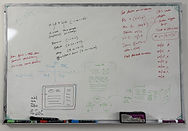
BRAINSTORMING SESSIONS
Led cross-functional brainstorming sessions with designers, developers, AI engineers, and stakeholders.
Focused on designing reflective conversation flows and engaging user interactions.
Ideated features that position Alice as a strategic, thought-provoking AI consultant.


FEATURES ADDED
Onboarding Questions
Conversational prompts to understand user goals, business challenges, and context.
Permissions Modal
Asks for user consent on data usage, aligning with ethical AI practices.
Subscription Model
A 30-day free trial followed by a subscription plan for continued access.
Hint Feature
Provides users with hints to help navigate the chat interface and enhance interactions.

PRICING FLOW
Analyzed value alignment and user expectations to inform pricing structure.
Introduced a 30-day free trial to reduce friction and encourage initial adoption.
Positioned the subscription model to reflect Alice’s long-term value as a strategic thought partner.
.png)
PRODUCT STRATEGY
The strategy for Alice revolves around differentiation, user engagement, and business value.
Positioning & Value Proposition
Alice is positioned as a thought partner, not just a chatbot, designed to facilitate reflective conversations for entrepreneurs, consultants, and business leaders
User-Centric Approach
A conversational onboarding flow personalizes the experience, while a minimal UI and human-like AI persona deepen engagement.
Technology & Innovation
Uses NLP and adaptive learning to guide deeper thinking, refine responses, and ensure ethical, transparent interactions.
Business Model & Growth
Subscription-based with a 30-day free trial, targeting growth through B2B partnerships and continuous AI enhancements informed by user data.
.png)
STEP 4
DESIGN
CREATING THE SOLUTION
In the design phase, I translated insights from research into structure and interaction. The goal was to simplify complex AI interactions into an intuitive, approachable interface.
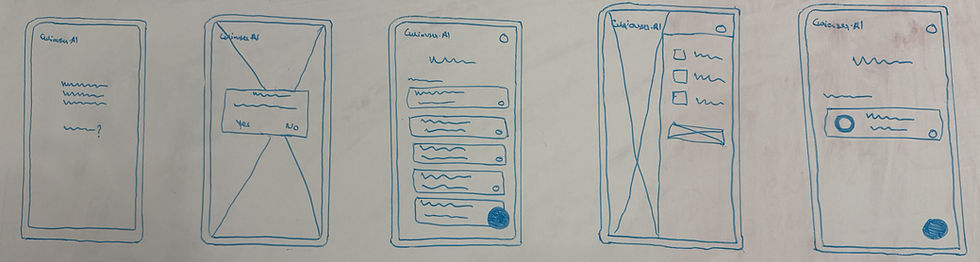
WIREFRAME
Clear navigation paths to guide users seamlessly through the app.
Clear CTAs highlighted, such as user input fields, summary download, and interactive elements.
Responsive design to cater to both mobile and desktop users.

STYLE GUIDE
The design uses a clean, minimal aesthetic to create a calm and focused user experience.
Blue was chosen as the accent color to reflect trust, calmness, and Alice’s reflective personality.
Accessible UI components, buttons, forms, and progress bars for intuitive interaction.
The overall visual direction balances professionalism with a touch of imagination, reflecting the brand’s curious and supportive personality.
.png)
VISUAL SCREEN DESIGNS


.png)
-1.png)
STEP 5
PROTOTYPE
ADDING INTERACTION TO THE DESIGN
Created high-fidelity prototypes using Figma to simulate the user flow and interactions. I utilized auto-layout and component-based design to ensure responsiveness across devices. Using Figma’s prototyping tools (smart animate, overlays, and timed transitions), I tested the user experience to ensure functionality and usability before moving to development.

STEP 6
TEST
VALIDATING THE SOLUTION
Testing ensures that Alice AI meets user expectations and functions smoothly. It includes usability tests to identify pain points, functional tests to ensure core features work as intended, and performance tests to assess speed and responsiveness. Feedback from real users will be gathered to iterate and improve the product, ensuring a seamless experience across all platforms.
USABILITY TESTING
Feedback Loop
Users liked Alice’s tone but preferred shorter responses.
Minimal UI was praised for reducing distractions.
Needed clearer visual hierarchy, improved typography and spacing.

ACCESSIBILITY TESTING
Prototype Testing
Interactive elements lacked focus indicators, enhanced for keyboard navigation.
Missing ARIA labels, added for improved screen reader support.
Improved alt text and semantic HTML for assistive technologies.

DESIGN ITERATION
Before
.png)
After
.png)
.png)

.png)
.png)
UX IMPACT
STEP 7
DEV HAND-OFF
INTERACTIVE PROTOTYPE
I created clickable prototypes in Figma to demonstrate key user flows and interaction states. This helped stakeholders visualize the product experience and gave developers a reference for transitions, behaviors, and motion.
DESIGN-TO-DEV
Delivered developer-ready Figma files with clear component specs and documentation.
Annotated flows and edge cases to ensure accurate implementation.
Collaborated via GitHub and Slack to address dev queries in real time.
Conducted UI reviews post-handoff to ensure pixel-perfect alignment.

KEY LEARNINGS
Task direction and duration matter — unclear onboarding steps lead to drop-off; a simple progress bar improved flow clarity.
Not everything needs to be defined — leaving space for user imagination can make experiences more inclusive and personal
Inclusivity is intentional — ethical design decisions, like permission prompts, help build user trust and transparency.
THE IMPACT
Increased sign-ups by 40% through optimized onboarding and conversational flow.
Boosted session duration by 3.5× by designing an engaging, dialogue-first chat experience.
Built a scalable design system to support future product iterations and align branding across web and app.
Streamlined communication across design, development, and marketing by maintaining living documentation and specs.
CONCLUSION
Working on Curiouser.AI was a transformative experience that deepened my expertise in product design, UI/UX, and brand strategy.


